2026-03-10
OTel 手动插桩
python
    with tracer.start_as_current_span("first_response") as parent_span:
        response = client.chat.completions.create(
            model=MODEL,
            messages=messages,
            tools=tools,
            tool_choice="auto",
        )
        response_message = response.choices[0].message

        if response_message.tool_calls:

            messages.append(
                {
                    "role": "assistant",
                    "content": response_message.content or "",
                    "tool_calls": [
                        {
                            "id": tc.id,
                            "type": tc.type,
                            "function": {
                                "name": tc.function.name,
                                "arguments": tc.function.arguments,
                            },
                        }
                        for tc in response_message.tool_calls
                    ],
                }
            )


            # 执行所有工具调用
            for tool_call in response_message.tool_calls:
                function_name = tool_call.function.name
                function_args = json.loads(tool_call.function.arguments)
                print(f"🔧 调用工具: {function_name}({function_args})")
                if function_name in tool_functions:
                    function_response = tool_functions[function_name](**function_args)
                else:
                    function_response = f"未知工具: {function_name}"
                print(f"📤 工具返回: {function_response}")

                messages.append(
                    {
                        "role": "tool",
                        "tool_call_id": tool_call.id,
                        "content": function_response,
                    }
                )

            with tracer.start_as_current_span("second_response") as child_span:
                second_response = client.chat.completions.create(
                    model=MODEL,
                    messages=messages,
                )

                return second_response.choices[0].message.content

    return response_message.content
古法编程魅力时刻
过去一周,我尝试了几种自动插桩的方式,并没有达到我预期的效果。 不知为何,总有种感觉,手动插桩会非常复杂,但今天在AI的协助下整个过程比较顺利。
我没有直接让AI去完成所有任务,而是照着OTel的文档一步一步来。
因为我这个应用很简单,插桩也比较容易:
- 先设置Pipeline和SIGNAL Provider(在这里是tracer)
- Processor
- Exporter
- 在需要的地方创建Span即可,创建Span需要Tracer,其来自Tracer Provider
python
from opentelemetry.sdk.resources import SERVICE_NAME, Resource
from opentelemetry import trace
from opentelemetry.sdk.trace import TracerProvider
from opentelemetry.sdk.trace.export import BatchSpanProcessor, ConsoleSpanExporter
from opentelemetry.exporter.otlp.proto.http.trace_exporter import OTLPSpanExporter

resource = Resource.create(attributes={SERVICE_NAME: "doubao-agent-service"})
# set up the pipeline
provider = TracerProvider(resource=resource)
processor = BatchSpanProcessor(
    OTLPSpanExporter(endpoint="http://localhost:4318/v1/traces")
)
provider.add_span_processor(processor)

# sets the global default tracer provider
trace.set_tracer_provider(provider)
# creats a tracer from the global tracer provider
tracer = trace.get_tracer("doubao-agent")
后续就是在需要观测的地方来创建Span并设置各种属性。
python
 with tracer.start_as_current_span("first_llm_call") as llm_span:
            llm_span.set_attribute(GenAIAttributes.GEN_AI_REQUEST_MODEL, MODEL)
            llm_span.set_attribute(GenAIAttributes.GEN_AI_OPERATION_NAME, "chat")
            llm_span.set_attribute(GenAIAttributes.GEN_AI_PROVIDER_NAME, "Volcaengine")
            llm_span.set_attribute(GenAIAttributes.GEN_AI_SYSTEM_INSTRUCTIONS, messages[0]["content"])
            llm_span.set_attribute(GenAIAttributes.GEN_AI_INPUT_MESSAGES, messages[1]["content"])

            response = client.chat.completions.create(
                model=MODEL,
                messages=messages,
                tools=tools,
                tool_choice="auto",
)在这个Span里设置的各种属性名源自Semantic Convention,这样可以让开发者在可观测后端上直观的了解智能体是如何处理这次请求的,因为可观测后端会根据规范对不同的属性设计匹配的样式。
例如,下图中对天气的提问,我将其设置为 gen_ai.input_messages 对应的值,在Langfuse上会直接显示在Input区域。当前模型启用了推理,示例中将推理内容放到了output.messages里,在这里我直接将其称作 gen_ai.reasoning_content。 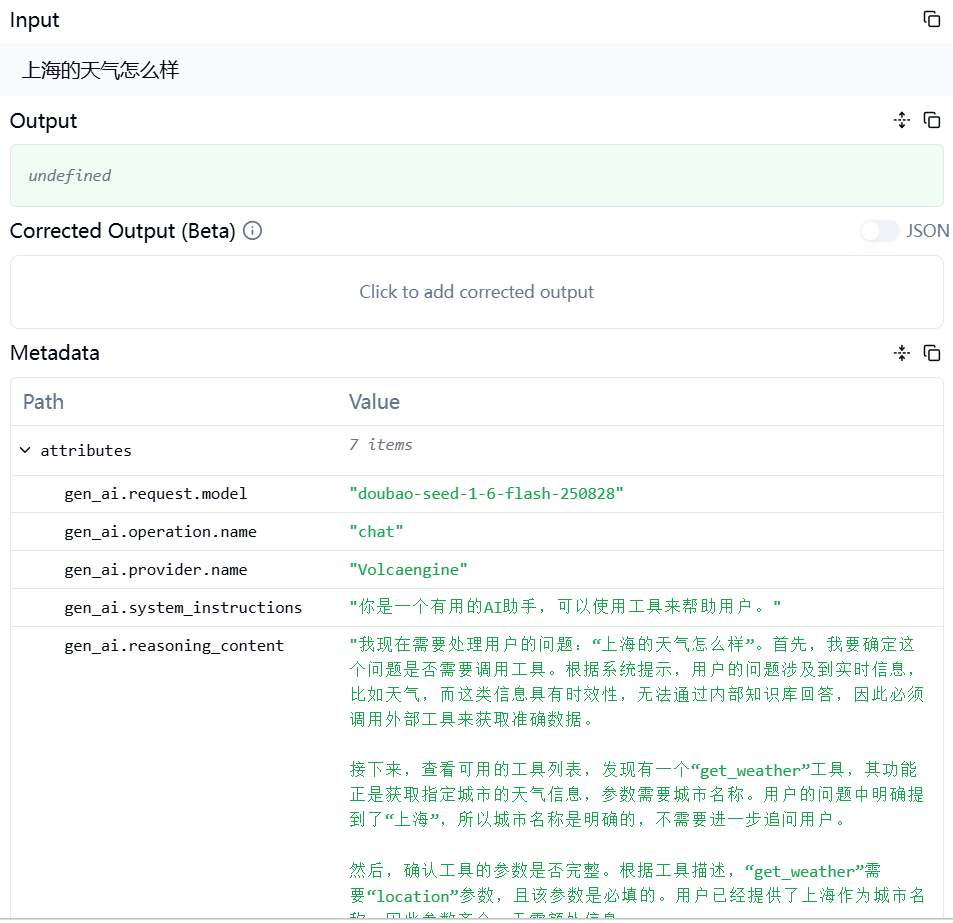
大模型在接到问题以及可用的工具集后,进行思考,认为应该调用get_weather工具来获取天气信息。 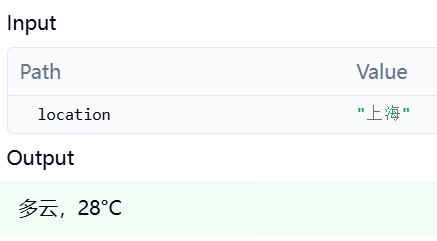
Agent将获取到的天气信息追加到整个消息记录的末尾,进行第二次LLM请求,获得最后的回答。 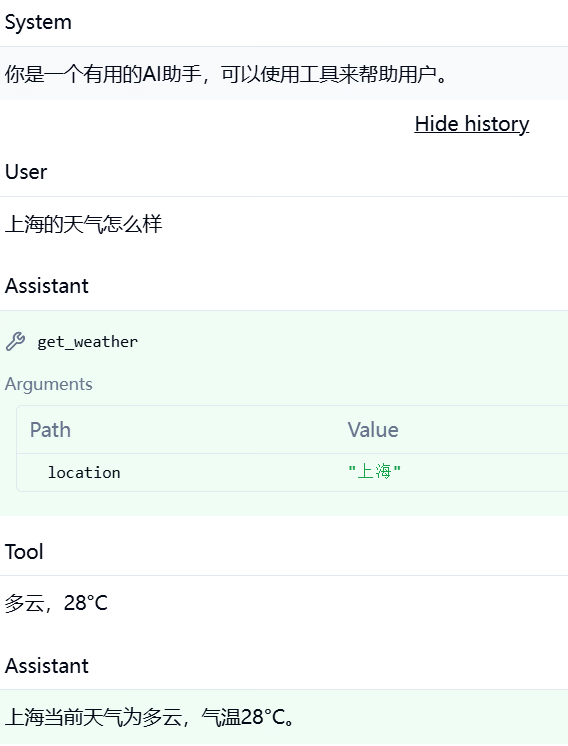
正确的逻辑结构
完成的第一版插桩所发出的遥测在Langfuse上不能正确的展示智能体的多个步骤,经AI修正后,效果如下。 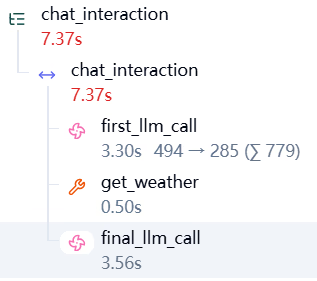
整个环节使用一个名为 chat_interaction的根Span来包裹,其中的first_llm_call、get_weather和final_llm_call都是实际的步骤,为每一步创建一个Span即可。