2026-03-10
OTel Manual Instrumentation
    with tracer.start_as_current_span("first_response") as parent_span:
        response = client.chat.completions.create(
            model=MODEL,
            messages=messages,
            tools=tools,
            tool_choice="auto",
        )
        response_message = response.choices[0].message

        if response_message.tool_calls:

            messages.append(
                {
                    "role": "assistant",
                    "content": response_message.content or "",
                    "tool_calls": [
                        {
                            "id": tc.id,
                            "type": tc.type,
                            "function": {
                                "name": tc.function.name,
                                "arguments": tc.function.arguments,
                            },
                        }
                        for tc in response_message.tool_calls
                    ],
                }
            )


            # Execute all tool calls
            for tool_call in response_message.tool_calls:
                function_name = tool_call.function.name
                function_args = json.loads(tool_call.function.arguments)
                print(f"🔧 Calling tool: {function_name}({function_args})")
                if function_name in tool_functions:
                    function_response = tool_functions[function_name](**function_args)
                else:
                    function_response = f"Unknown tool: {function_name}"
                print(f"📤 Tool returned: {function_response}")

                messages.append(
                    {
                        "role": "tool",
                        "tool_call_id": tool_call.id,
                        "content": function_response,
                    }
                )

            with tracer.start_as_current_span("second_response") as child_span:
                second_response = client.chat.completions.create(
                    model=MODEL,
                    messages=messages,
                )

                return second_response.choices[0].message.content

    return response_message.content
The Charm of Old-School Programming
Over the past week, I tried several approaches to automatic instrumentation, but none achieved the results I expected. Somehow, I always had a feeling that manual instrumentation would be very complicated, but today, with the help of AI, the whole process went quite smoothly.
I didn't let AI do everything directly; instead, I followed the OTel documentation step by step.
Since my application is simple, instrumentation was relatively easy:
- First set up the Pipeline and SIGNAL Provider (here, it's the tracer)
- Processor
- Exporter
- Then create spans where needed. Creating a span requires a Tracer, which comes from the Tracer Provider.
from opentelemetry.sdk.resources import SERVICE_NAME, Resource
from opentelemetry import trace
from opentelemetry.sdk.trace import TracerProvider
from opentelemetry.sdk.trace.export import BatchSpanProcessor, ConsoleSpanExporter
from opentelemetry.exporter.otlp.proto.http.trace_exporter import OTLPSpanExporter

resource = Resource.create(attributes={SERVICE_NAME: "doubao-agent-service"})
# set up the pipeline
provider = TracerProvider(resource=resource)
processor = BatchSpanProcessor(
    OTLPSpanExporter(endpoint="http://localhost:4318/v1/traces")
)
provider.add_span_processor(processor)

# sets the global default tracer provider
trace.set_tracer_provider(provider)
# creates a tracer from the global tracer provider
tracer = trace.get_tracer("doubao-agent")
Next, create spans and set various attributes where observation is needed.
    with tracer.start_as_current_span("first_llm_call") as llm_span:
            llm_span.set_attribute(GenAIAttributes.GEN_AI_REQUEST_MODEL, MODEL)
            llm_span.set_attribute(GenAIAttributes.GEN_AI_OPERATION_NAME, "chat")
            llm_span.set_attribute(GenAIAttributes.GEN_AI_PROVIDER_NAME, "Volcaengine")
            llm_span.set_attribute(GenAIAttributes.GEN_AI_SYSTEM_INSTRUCTIONS, messages[0]["content"])
            llm_span.set_attribute(GenAIAttributes.GEN_AI_INPUT_MESSAGES, messages[1]["content"])

            response = client.chat.completions.create(
                model=MODEL,
                messages=messages,
                tools=tools,
                tool_choice="auto",
            )
The attribute names set in this span come from the Semantic Convention, which allows developers to intuitively understand how the agent processed a request in an observability backend, because the backend can style different attributes according to the specification.
For example, in the image below, for a weather query, I set gen_ai.input_messages to the corresponding value, and it is displayed directly in the Input area on Langfuse. The current model has reasoning enabled; the example places reasoning content in output.messages, but here I simply call it gen_ai.reasoning_content.
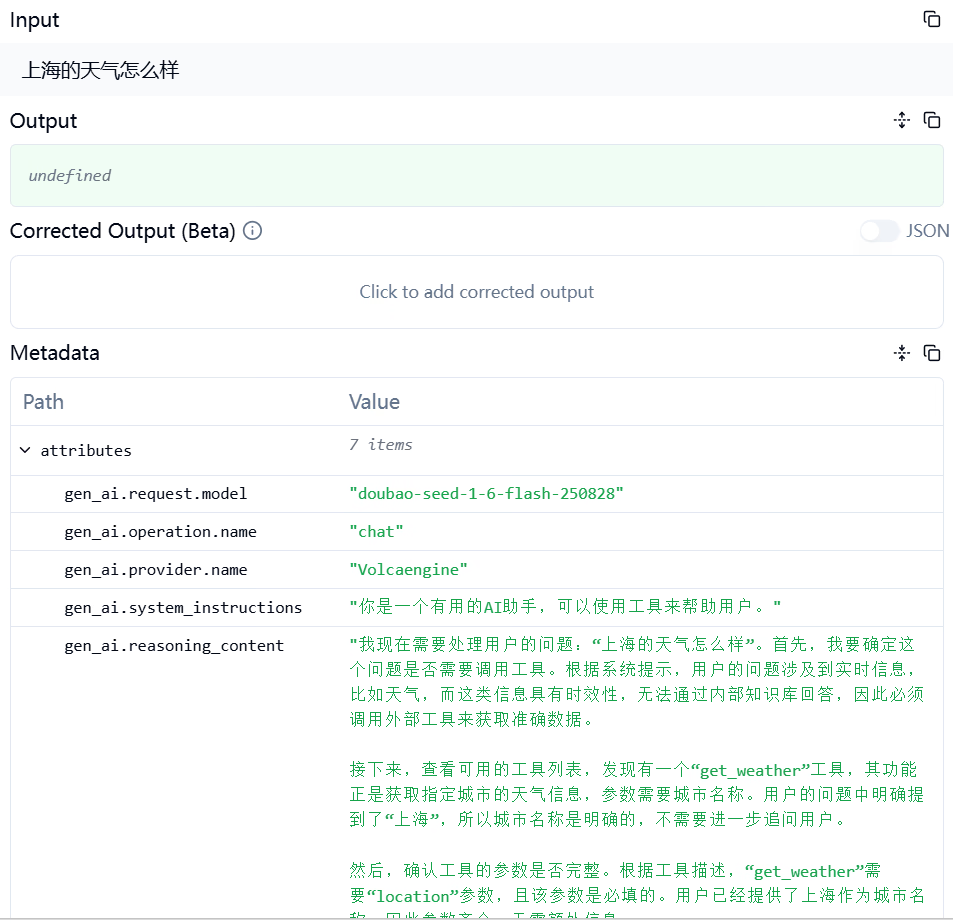
After receiving the question and the available tool set, the LLM thinks and decides to call the get_weather tool to retrieve weather information.
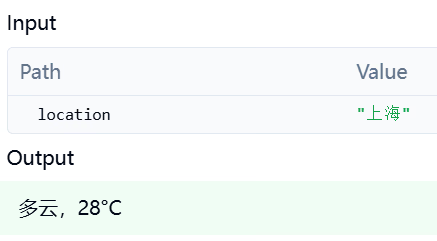
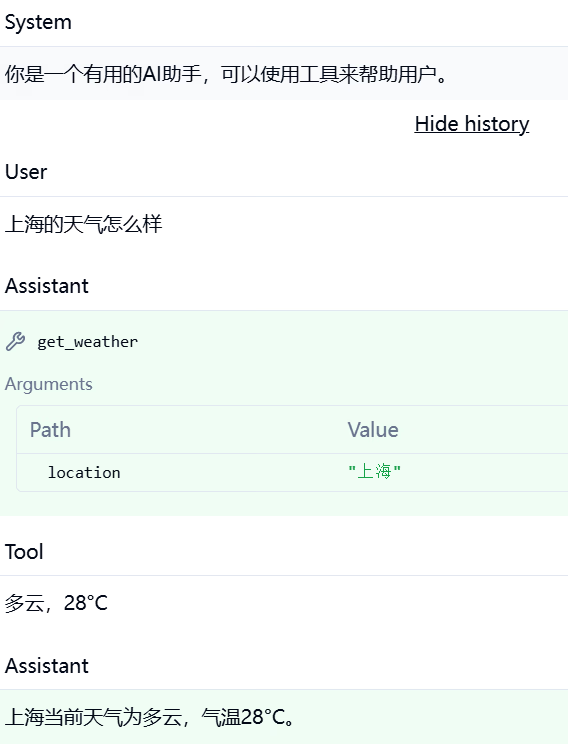
The agent appends the retrieved weather information to the end of the entire message record, makes a second LLM request, and obtains the final answer.
Correct Logical Structure
In the first version of instrumentation I completed, the telemetry emitted did not correctly display the multiple steps of the agent on Langfuse. After correction by AI, the effect is as follows.
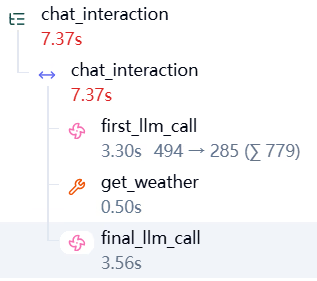
The entire process is wrapped in a root span called chat_interaction, and first_llm_call, get_weather, and final_llm_call are the actual steps. Simply create a span for each step.